Showing posts with label JavaScript. Show all posts

Wednesday, August 1, 2012

Javascript Find Arguments Passed to a Function

While working on Javascript optimization we can always use some functions having variable number of arguments.
E.g. if we come across a situation where we have to use one function to toggle visibility of the objects, but depending on clients input number of objects which needs to hide/show varies. In this case we can write a function as below where number of parameters can any variable.
//Assumption 0th parameter is boolean 

 function toggle() {
        var args = toggle.arguments
        for (v = 1; v < args.length; v++) {
            obj = window.document.getElementById(args[v]);
            if (args[0]) obj.style.display = "";
            else obj.style.display = "none";
        }
    }
We can use this type of functions to minimize size of javascript before optimizing it.
Submit this story to DotNetKicks

Read more...

Display rupee symbol website

To display Rupee Symbol to website use following code.
Ruppee Symbol

  1. Add a stylesheet link in the head section of your webpage:


  • Add the following code enclosing your "Rs."
    Rs. 1000
    
  • OR Just include the following javascript and it will update all the "Rs" / "Rs." for you
    
    
    This is how we can display indian rupee symbol in website/blog. If Unicode is supported then we can use rupee symbol positioned at U+20B9.
    Submit this story to DotNetKicks

    Read more...

    Thursday, May 5, 2011

    Disable Text Selection using Javascript

    In the web development cycle, at times we come to a requirement where we need to disable text selection for some HTML Tags i.e. "Do not allow to select text present in some particular Div tag, or span tag or text present in some table" in that case we can use following function. Actually this JavaScript function can be used to Disable Text selection for whole body of the HTML.

    function disableSelection(target) {
            if (typeof target.onselectstart != "undefined") //IE route
                target.onselectstart = function () { return false }
            else if (typeof target.style.MozUserSelect != "undefined") //Firefox route
                target.style.MozUserSelect = "none"
            else //All other route (ie: Opera)
                target.onmousedown = function () { return false }
            target.style.cursor = "default"
        }


    Define above function in HEAD tag and call this function either on some form event or directly at the bottom of the HTML page.

    //disableSelection(document.body) //Disable text selection on entire body
    
    disableSelection(document.getElementById("mydiv")) //Disable text selection on element with id="mydiv"
    

    This is very small function but it was very useful for one of my project.
    Submit this story to DotNetKicks

    Read more...

    Friday, April 29, 2011

    Javascript String Replace All Function

    JavaScript String Replace function only replaces the first occurrence in the string. Replace function takes two simple parameters, The first parameter is the pattern to find and the second parameter is the string to replace the pattern with when found. The javascript function does not Replace All...

    str = str.replace(”Pattern”,”ReplaceString”)

    To ReplaceAll you have to do it a little differently. To replace all occurrences in the string, use the g modifier like this:
    str = str.replace(/Pattern/g,”ReplaceString”)
    Submit this story to DotNetKicks

    Read more...

    Friday, January 14, 2011

    Display Loading Image in Asp.net

    To display loading image we shall use following JavaScript. There are many ways to display loading, but I feel this is the simple to use and implement. We just need one div tag with position set to absolute, and put loading image inside the div tag. Check out following code.

    Loading...

    (Make sure you set z-index if required.)
    In above I have just used text "Loading...", instead of this you can put loading images.Put this div tag as first element of FORM tag. And after above div tag immediately put following JavaScript 


    And call function "init()", on "onload" event of body tag.

    Done, now as your page loads you can see "Loading..."... Submit this story to DotNetKicks

    Read more...

    Friday, August 13, 2010

    Page Methods

    This article is all about the page methods and their usage. PageMethods is the part of Ajax.net and Script Manager.
    MS Ajax gives us ability to directly create a web method on aspx page. And also enable to directly call this web method from the page. This method is termed as Page Method.
    This is very easy way to implement Ajax functionality on the page. Like ICallback event handler here also we need to manipulate the string.
    Page Method works simply as Web Methods
    Script Manager Play critical role for the use of Page Methods, we need to set EnablePageMethods attribute to true.

    To use web method attribute in Aspx page, use namespace
    using System.Web.Services
    Page Method should be static, as per the design by MS. So our web method (Page Method) will be as follows.

    Now to call above method from client script we need to add PageMethods before the method name
    PageMethods.HelloUser("Test User");
    This will simply call the Method defied in Page, i.e. .cs file
    Many times we need to handle different methods in different way, so in that case we need some special mechanism to handle the response from the server. We may also need to handle method failure errors in some customized way; we can also achieve this by adding extra parameters in PageMethods call.
    In short we can add callback methods for successful invocation of pagemethods as well as for the failure of the pagemethod.

    Basic Method prototype is
    PageMethods.MethodName([para1,para2,…],[OnSucceeded, defaultFailedCallback,userContext]);

    Above code work perfectly for normal scenario.
    There might be possibility that we create our own JavaScript wrapper class, which internally uses PageMethods in that’s case, we might have following requirements.
    • Set defaultFailedCallback
    • Set defaultSucceededCallback
    • get defaultFailedCallback
    • get defaultSucceededCallback
    • set timeout
    • get timeout
    Let’s say we have defined default Failed and Succeeded callbacks. Thus whenever we call some method like PageMethod.HelloUser(username), now if this method call completes its execution successfully our default Succeeded callback function will be called automatically. If method throws some error or failed, default Failed callback function will be called.
    Also we need to call some already existing PageMethods but from some other pages; then in that case we should be able to set the path of the page in which methods are defined.
    Considering above requirement we can modify the code as below.

    With this understanding we can use pageMethods very effectively to handle static Page methods.

    Download Demo Code here --> PageMethod3.5.zip

    Submit this story to DotNetKicks

    Read more...

    Thursday, August 12, 2010

    Asp.Net - Handling Long Running Process in Web Development

    Sometimes in web development we need to run long processes. During such time we come across browser request time out issues. Whether we use Ajax or not, if process is very long running, browser will through time out error. Also there are some processes which needs to be initiated in background, then user can redirect to other page. Once the Process is over user can retrieve the data from long running process.
    In case of Ajax.Net if we use script manager then also we have to define time out for the request. Imagine the scenario in which we can’t predict what time the process will take to execute e.g. it may take 5-7 minutes in such cases browser may give timeout error.
    In this article we will discuss about this issue and how to use Ajax to handle long running process; using IAsyncResult, ICallbackEventHandler.
    Concept behind Logic
    Web application is a client-server architecture, so when client hits server; server will reply. If long process is running on the server, then we need some mechanism by which we will come to know that long process is over. And using Ajax we can very well do polling. But when on server side, long running process is going on , rest of the code will not get execute unless that process overs. To handle this issue we will use IAsyncResult . Using this interface and delegates we will able to run asyncronous process on server side.
    For this logic is we invoke one method on server side and continue with other tasks; once first method is over it will automatically call another server method so that we can update some parameters say VAR1 and VAR2. And using ICallback we will check for VAR1 and VAR2, as soon as we get updated values, we will change status of long running method on client. (In Demo code we have used Session Variable Named result )
    About IAsyncResult, delegate and AsyncCallback in our code (Refer DEMO CODE for better understanding)
    Classes which support asynchronous operation or method implements IAsyncResult interface. IAsyncResult objects are passed to methods invoked by AsyncCallback, when an asynchronous operation overs. Classes which supports AsyncCallback in their methods return object of IAsyncResult; check out FileStream.BeginRead and FileStream.EndRead, these methods support AsyncCallback hence return type is IAsyncResult. Same is true for BeginGetRequestStream method of WebRequest.
    If we see the parameters in these method then there is one parameter “AsyncCallback callback”; now callback is the method which gets called once Async method is over. In our code this method is represented by CallBackMethod function.
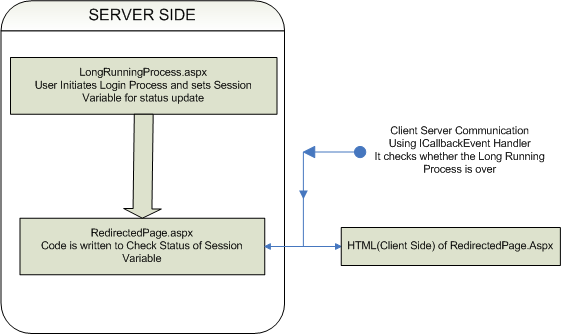
    PROCESS FLOW(LOGICAL FLOW)
    In our this code, we have used async method of delegate, i.e. BeginInvoke and EndInvoke.
    On server side, we have used delegate and on button click event function named DoSomething() get called. This function take cares of LongRunningMethod registration for delegate and invoking of LongRunningMethod; this will be asynchronouse invokation on server side. While invoking LongRunningMethod we register AsyncCallback method i.e. CallBackMethod. In CallBackMethod we get object of IAsyncResult class as paramter. In this method we have just called EndInvoke method of delegate.
    CallBackMethod method can be used to do other operations which may be dependent on the LongRunningMethod.
    We will write our LongRunningMethod,that will be as follows

    Above methos is simple implemtation for longrunning method.
    We will declare delegate for above function , parameters for delegate and method should be same.
    private delegate void LongRun(string name);
    Implementation of Async process on server side

    On button click event we will call DoSomething function.

    Long.BeginInvoke in DoSomething will invoke LongRunningMethod method.
    While implenting this just check parameters for BeginInvoke in .net.
    CallBackMethod get called automatically after LongRunningMethod. CallBackMethod is used to end the invokation of delegate.
    Upto this point we were discussing about Asynchronouse method invocation on server side. Now we will talk about Ajax check using ICallbackEventHandler for LongRunningMethod. (Note: if your are new to ICallbackEvent Handler, check out my article on ICallback, you can also download ICallback Demo. )
    On Button Click in Above code (i.e. in LongRunningProcess.aspx page in demo) we initiate Long Running Process and Redirect to RedirectedPage.aspx. On Redirected Page we use ICallback to check status of LongRunning Process. We have used Session["result"] to check the status. Please make sure that you are understanding the code.
    Using ICallbackEventHandler client browser polls to server for chekcing whether LongRunningMethod is over or not; in predefined time interval. If the process is over we send SUCCESS to client side. So if response from server singnifise that the LongRunningMethod is over we update the client. (RedirectedPage.aspx takes care of the status check, on this page we can have our other elements and other business logic, while in backend we can check for status of longrunning process.)
    Here I assume that you are aware about the ICallbackEvent Handler, if not then please go through my article related to ICallback.
    Download Demo Code For Free --> LongRunningProcess.zip , ICallbackEvent Handler
    Submit this story to DotNetKicks

    Read more...

    Sunday, July 25, 2010

    XMLHTTPJSClass - JSON Class for Ajax Operations

    In the development of Ajax application many times we may come across following issues.
    • Need to update multiple text boxes simultaneously.
    • Fill more that one dropdown lists.
    • Combination of text boxes, dropdown lists and div tags.
    • Calling different web pages and different webservices

    Means one event may lead to updating of many html elements. In such cases we will have to send Ajax request in a loop. Again for each request we will have to take care of timeouts and request failures. Here if data is static we can keep it on HTML page and using JavaScript can directly hide and show the contents. But if we have to use real time data and also choices of display vary according to choices of the user, in such case looping of Ajax request may not be a good idea.

    In this article we will discuss about XMLHTTPRequest object and JavaScript. We will develop a JavaScript class in which we can vary our choices and also be able to update multiple HTML contents. Also this class can be extended as per the requirements.

    We will first talk about class in JavaScript, there is no keyword called class in JavaScript but we can use function as a class.

    Checkout following code


    In above script if we remove obj.Msg = "HI"; we will get an alert with text Hello.


    Now step by step we will start developing our JavaScript class.
    1.Include JS file and write following


    In this step we have created XMLHTTPRequest object and simply send call to the server. By default method is GET (this.Method = "GET") and calling type is Ascynchronous (this.Async = true)


    2.In this step we will develop simple logic which will allow us to dynamically call Ajax function.

    For this in our above Ajax function we will add one JSON (www.json.org) object as follows.


    In above script we can set the default values for all. Please reffer demo JS file to understand this better. We will use these values to set response from the server to textboxes,drop down lists,Div tags, td tags etc. Using "CallPage" : "CallPage.aspx" we can define default server page and while calling Ajax function we can reset this value to web method or to any other web page.
    As we will proceed in this article we will come to know how can we change all above values and how can we use it for multiple updation.Also we will see that how to extend the class for further customization.

    3.As we have seen in 1st step;

    this.request.onreadystatechange=this.handleResponse;
    In this step we will develop this.handleResponse function also in this function we will use JSON object defined in 2nd step.
    Whenever this.handleResponse function gets call script looses the focus of this. To keep trac of this object we will assing it to some variable. i.e


    In this function we will be able to receive data from server. Once we get the data we can play with it the way we want.
    This function will take care of the responses from web services as well as from web pages.
    Difference is, web service returns response in the form of XML where are response from the webpage can be defined by web developer.

    The function will be as follows


    If there is any problem in understanding please go through above code again.

    In the the 1st step we have


    While developing Ajax application take care of following point.
    • URL for XMLHTTPRequest object should belong to same domain.
    • Firefox and other browser doesn’t allow cross domain communication.
    • IE will show warning

    Thus our


    e.g. "http://localhost/Demo/CallPage.aspx?"+this.JSONArray.Querystring;

    Also when ever we want to call web methods like above example, we need to set following protocols under in web.config file.


    4.Up to this point we have finished with development of Ajax logic which will return us response. And in this point we will develop logic for population HTML controls

    In this.handleResponse (step 3) we have seen that we get response in
    “data” variable in JavaScript.

    So once we got response from the server we will write following logic


    self.JSONArray.isEdit[0].textBoxId will contain id of the text box in which we have to fill the response. And data is the response from the server.
    In 2nd step we have defined JSON object as follows


    And in our above switch we have simply used the elements of JSON object

    At this point we will see how to call our Ajax Class, how to initiate the request and how to set Elements of our JSON object.
    Simply create object of our AjaxClass().


    if obj.JSONArray.dependentType=1 then our switch case will not work for text box, but it will work for dropdown list (check above switch case). Means we will have to set dropdown list of JSON object.


    and so on, we can define our own set of HTML controls to be filled.

    In the same way we can change all default settings in JSON object of that class.
    e.g. obj.JSONArray.Method = "GET";
    obj.JSONArray.CallPage = "Mywebservice/webMethod";
    obj.JSONArray.Querystring= "My querystring";

    For this URL will be


    In case of web service we will have to set CallPage element in the same way we did in above example.

    Now for multiple textboxes simple trick,
    obj.JSONArray.isEdit[0].textBoxId="txt1$txt2$txtn";//$ is a delimiter
    While sending data from server send it with the same delimiter,in such a way when we split obj.JSONArray.isEdit[0].textBoxId and response data on $; we will get one to one data and textBoxId.

    Now we can have different types like “txtbox(es) + drop down list(s) + div” in such case we can use "misc" option of isEdit element of JSON object.
    And we can define our PopulateControls function the way we want.

    Just think of the choices for getting Response from AjaxCall; we can develop very critical systems using this logic and keeping code as simple as possible. Also we can integrate our ICallback logic for large data transfer.


    Demo JavaScript file is as below ( DOWNLOAD)


    Download Demo Code here --> XMLHTTPJSClass.zip

    Submit this story to DotNetKicks

    Read more...