Showing posts with label Ajax. Show all posts

Friday, November 18, 2011

Error : Could not find any resources appropriate for the specified culture or the neutral culture

Just recieved this error:
Could not find any resources appropriate for the specified culture or the neutral culture.  Make sure "AjaxControlToolkit.Properties.Resources.NET4.resources" was correctly embedded or linked into assembly "AjaxControlToolkit" at compile time, or that all the satellite assemblies required are loadable and fully signed. 

Could not find any resources appropriate for the specified culture or 
the neutral culture.  Make sure 
"AjaxControlToolkit.Properties.Resources.NET4.resources" 
was correctly embedded or linked into assembly "AjaxControlToolkit" 
at compile time, or that all the satellite assemblies required are
loadable and fully signed.

Ajax Tool kit realted .Net errors look a lot more worse than they really are.
What we have to do is simply add scriptManager ;)
 
<ajax:ToolkitScriptManager 
ID="ToolkitScriptManager1" 
runat="server" />
Submit this story to DotNetKicks

Read more...

Sunday, October 10, 2010

Image Handling in Asp.net

This article discuss about Image Handling, which in turns become important while handling high resolution images and displaying them in different sizes. Especially in case of E-commerce web applications, where admin can add different images of the same product so that users can get feel of the products. Also for image galleries where we need display same image in different sizes with zoom in and zoom out options.
For above requirement following points should be considered
  • Image should not distorted when re-sized.
  • Quality of the image should remain same.
  • If image is of High resolution then while displaying image is different sizes; the image which loads in browser should be of relative size. E.g. suppose image resolution is of 2736x3648, and we resize such high resolution image in the size of 200x300, then the new small image should be of relative size, i.e. original image size is 3.34MB then while displaying in small size it should be reduced as per size.
  • All images displayed in browser should be of same time, i.e. user can upload images like JPEG, JPG, BMP, TIFF etc. and while displaying all images should be displayed in PNG format only.
  • End user should be able save image of size which he/she is able to see in browser. i.e. if browser is showing image with 200x300 size; user can save image by right clicking it, then the image which is getting saved should be of the 200x300 size only.
Download DemoCode for better understanding of this article, you can also get to debug code while reading the article.
The main file for all above operations is ImageHandler.ashx, its a http handler file, in that file following function takes care of resizing of image, just check it out.
private Image ResizeImage(Image img, int maxWidth, int maxHeight)
    {
        if (img.Height < maxHeight && img.Width < maxWidth) return img;
        Double xRatio = (double)img.Width / maxWidth;
        Double yRatio = (double)img.Height / maxHeight;
        Double ratio = Math.Max(xRatio, yRatio);
        int NewX = (int)Math.Floor(img.Width / ratio);
        int NewY = (int)Math.Floor(img.Height / ratio);
        Bitmap imgCopy = new Bitmap(NewX, NewY, System.Drawing.Imaging.PixelFormat.Format32bppArgb);
        Graphics graphicsImg = Graphics.FromImage(imgCopy);
        graphicsImg.Clear(Color.Transparent);
        graphicsImg.InterpolationMode = System.Drawing.Drawing2D.InterpolationMode.HighQualityBicubic;
        //HighQualityBicubic gives best quality when resizing images
        graphicsImg.DrawImage(img,
            new Rectangle(0, 0, NewX, NewY),
            new Rectangle(0, 0, img.Width, img.Height),
            GraphicsUnit.Pixel);
        graphicsImg.Dispose();
        img.Dispose();
        return imgCopy;
    }
Above function takes care of re-sizing of image, this function simply maintains the quality of image, and if image which we are re-sizing is less than in size than that we are asking for, this function simply returns the image. To avoid distortion of image on re-sizing we have maintained aspect ratio too.
We are using ashx file as query string in Image source, which picks up image and render it in desired size code is as below.

So remaining code of our Ashx file is as below
string sImageFileName = "";
    string imageSize = "";
    int oldHeight, oldWidth, NewHeight, NewWidth;

    System.Drawing.Image objImage;
    
    public void ProcessRequest (HttpContext context)
    {
        sImageFileName = context.Request.QueryString["img"];
        imageSize = Convert.ToString(context.Request.QueryString["sz"]);

        if (imageSize == "Small") NewHeight = 50;
        else if (imageSize == "Thumb") NewHeight = 160;
        else if (imageSize == "Medium") NewHeight = 320;
        else if (imageSize == "Large") NewHeight = 640;
        
        objImage = System.Drawing.Bitmap.FromFile(System.Web.HttpContext.Current.Server.MapPath("Images//" + sImageFileName));

        oldHeight = objImage.Height;
        oldWidth = objImage.Width;
        NewWidth = oldWidth * (NewHeight / oldHeight);

        objImage = ResizeImage(objImage, oldHeight, NewHeight);

        MemoryStream objMemoryStream = new MemoryStream();
        objImage.Save(objMemoryStream, System.Drawing.Imaging.ImageFormat.Png);
        byte[] imageContent = new byte[objMemoryStream.Length];
        objMemoryStream.Position = 0;
        objMemoryStream.Read(imageContent, 0, (int)objMemoryStream.Length);

        context.Response.BinaryWrite(imageContent);
    }
 
    public bool IsReusable
    {
        get 
        {
            return false;
        }
    }

 
    private bool callback()
    {
        return true;
    }

We have developed logic for image handling in mainly two files one is web user control i.e. webImageGallery.ascx and another is ImageHandler.ashx.
Check out folder structure of the democode.
Following Html code of imgGallery.ascx is, do refer democode.
We have one function in imgGallery.ascx.cs file, which builds gallery kind of logic is named CreateImages(), and its code is as below, you can put your own logic for creating image gallery the way you want, I tired to keep logic simple. Once you build do solution check out source code of the gallery. Its simple JavaScript which changes image source on click on thumb image.
protected void CreateImages()
    {
        int Count = 0;
        HtmlTableRow _htmlTableRow = new HtmlTableRow();
        _ProductTable.Rows.Add(_htmlTableRow);

        Directory.SetCurrentDirectory(imagePath);

        for (Count = 1; Count <= imageCount; Count++)
        {
            HtmlTableCell _htmlTableTd = new HtmlTableCell();
            _htmlTableRow.Cells.Add(_htmlTableTd);
            _htmlTableTd.Align = Convert.ToString(setImageAlign);
            Image _ThumbImage = new Image();
            _htmlTableTd.Controls.Add(_ThumbImage);
            if (Convert.ToString(setBorder) == "True")
            {
                _ThumbImage.BorderStyle = BorderStyle.Solid;
                _ThumbImage.BorderWidth = 1;
            }
            _ThumbImage.ID = ThumbImageName + Count;
            _ThumbImage.ImageUrl = "ImageHandler.ashx?img=" + imageNames[Count - 1] + "&sz=" + Convert.ToString(setThumbImageSize);
            _ThumbImage.Attributes.Add("onclick", "javascript:ImageButton_OnClientClick('" + _mainImage.ClientID + "','" + imageNames[Count - 1] + "','" + setMainImageSize + "');");
        }

        _mainImage.ImageUrl = "ImageHandler.ashx?img=" + imageNames[imageCount - (Count-1)] + "&sz=" + Convert.ToString(setMainImageSize);
    }
Please check out variables in DemoCode, they are simply used as properties.
Once websuercontrol is ready, we simply drag and drop it in Default.aspx page and set following properties of the imageGallery web user control.
protected void Page_Load(object sender, EventArgs e)
    {
        ImageGallary.ImagePath = Server.MapPath("Images");
        ImageGallary.ImageNames = new string[] { "1_1.JPG", "1_2.JPG", "1_3.JPG", "1_4.JPG", "1_5.JPG" };
        ImageGallary.ImageCount = ImageGallary.ImageNames.Length;
        ImageGallary.SetImageAlign = _ImageAlign.Left;
        ImageGallary.SetMainImageSize = _ImageSize.Medium;
        ImageGallary.SetThumbImageSize = _ImageSize.Small;
        ImageGallary.SetBorder = _Border.True;
    } 
Download Democode here---> ImageUserControl.zip Submit this story to DotNetKicks

Read more...

Saturday, August 14, 2010

Solved: Could not load type 'System.Web.UI.ScriptReferenceBase'

I came across following error while using AjaxToolKit 3.5, well it is a very common error I think, and I got the solution too.
Could not load type 'System.Web.UI.ScriptReferenceBase' from assembly 'System.Web.Extensions, Version=3.5.0.0, Culture=neutral, PublicKeyToken=31bf3856ad364e35'.
Above error occurs because of the presence of  asp:ToolkitScriptManager, just replace this toolkitscriptManager with normal asp:ScriptManager
This simply works, no need to get panic about this error :)

Submit this story to DotNetKicks

Read more...

Friday, August 13, 2010

Page Methods

This article is all about the page methods and their usage. PageMethods is the part of Ajax.net and Script Manager.
MS Ajax gives us ability to directly create a web method on aspx page. And also enable to directly call this web method from the page. This method is termed as Page Method.
This is very easy way to implement Ajax functionality on the page. Like ICallback event handler here also we need to manipulate the string.
Page Method works simply as Web Methods
Script Manager Play critical role for the use of Page Methods, we need to set EnablePageMethods attribute to true.

To use web method attribute in Aspx page, use namespace
using System.Web.Services
Page Method should be static, as per the design by MS. So our web method (Page Method) will be as follows.

Now to call above method from client script we need to add PageMethods before the method name
PageMethods.HelloUser("Test User");
This will simply call the Method defied in Page, i.e. .cs file
Many times we need to handle different methods in different way, so in that case we need some special mechanism to handle the response from the server. We may also need to handle method failure errors in some customized way; we can also achieve this by adding extra parameters in PageMethods call.
In short we can add callback methods for successful invocation of pagemethods as well as for the failure of the pagemethod.

Basic Method prototype is
PageMethods.MethodName([para1,para2,…],[OnSucceeded, defaultFailedCallback,userContext]);

Above code work perfectly for normal scenario.
There might be possibility that we create our own JavaScript wrapper class, which internally uses PageMethods in that’s case, we might have following requirements.
  • Set defaultFailedCallback
  • Set defaultSucceededCallback
  • get defaultFailedCallback
  • get defaultSucceededCallback
  • set timeout
  • get timeout
Let’s say we have defined default Failed and Succeeded callbacks. Thus whenever we call some method like PageMethod.HelloUser(username), now if this method call completes its execution successfully our default Succeeded callback function will be called automatically. If method throws some error or failed, default Failed callback function will be called.
Also we need to call some already existing PageMethods but from some other pages; then in that case we should be able to set the path of the page in which methods are defined.
Considering above requirement we can modify the code as below.

With this understanding we can use pageMethods very effectively to handle static Page methods.

Download Demo Code here --> PageMethod3.5.zip

Submit this story to DotNetKicks

Read more...

ICallback Event Handler

This article will explain the use of “ICALLBACKEventHandler” in asp.net 2.0.
About ICallbackEventHandler:
ASP.NET 2.0 introduces an interface ICallbackEventHandler (System.Web.UI.ICallbackEventHandler) to allow asynchronous communication with the server. Unlike Postback, in Callback only user defined information is sent back to the server.
ICallbackEventHandler uses DoCallback event to send user defined data to server (instead of postback event), and return the String to client; on client side JavaScript manipulates the string. This interface implements two functions on server side (i.e. c# or vb) and we need to implement two functions on client side i.e. in JavaScript.(You can DOWNLOAD demo Code for Reference)
Use of ICallbackEventHandler:
To use ICallbackEventHandler, we need to impliment it on the page or on the User control. The code will be look like

Once we impliment this interface; we will have to play with 4 functions, two client side functions i.e. java script function, and two server side function i.e. c# (in this case).
As from ICallbackEventHandler, we have to use two functions namely (These functions or methods belongs to ICallbackEventHandler interface. C#)
1.public void RaiseCallbackEvent(String eventArgument)
2.public String GetCallbackResult()
RaiseCallbackEvent function gets call automatically whenever there is a CallbackEvent. And after this function 2nd function i.e. GetCallbackResult get called automatically.
2nd function returns a string to client.
How to raise a CallbackEvent?
To raise a callback event from client side we will use javascript function.
There will be two javascript functions whos functionality is as follows
1.Function which will call RaiseCallbackEvent, i.e. raise a callback event.
2.Function which will handle the response from the server. This function will be called automatically after GetCallbackResult(). I.e. the string returned by GetCallbackResult will appear in JavaScript as input to this function.
We will go on developing the code for better understanding of ICallbackEventHandler.
1.Create ASPX page design as follows

In above design “CheckForTimeZone()” in the button tag, is a javascript function, we will add it latter, under javascript tag.
Here button is a HTML control.
2.After this; we will write following JavaScript to the Aspx page.

You can just copy paste the code.
In above code “CallServer(selectedItem, "")” will be responsible for calling “RaiseCallbackEvent” on server side.
And “ReceiveServerData(retValue)” function gets called by
public String GetCallbackResult().
To make above code work the way we want; we will write code in aspx.cs file.
3.We will add C# code i.e. ASPX.Cs file

Please go through the above code line by line and then continue with following explanations.
String cbReference = Page.ClientScript.GetCallbackEventReference(this, "arg", "ReceiveServerData", "context");
If we debug the code “cbReference” will contain “WebForm_DoCallback('__Page',arg,ReceiveServerData,context,null,false)”;
Observe the string, WebForm_DoCallback contains ReceiveServerData, it’s a java script function we have written in step 2.

Again “callbackScript” will contain some string. Actually it is a JavaScript function which we will register to the client page. Using

Using above line of code we have registered our CallServer function to the page.
In above point we are registering the CallServer function. Now again see the 2nd point we are passing selected item of the Dropdown list to this function.
i.e. CallServer(selectedItem, "");
if you see the source code of the page then CallServer function will appear as follows

This CallServer function is responsible to raise the callbackEvent i.e. RaiseCallbackEvent(String eventArgument), and the “arg” will be appeared as eventArgument.
4.We will add RaisecallbackEvent and GetCallbackResult.
Add following code to aspx.cs file


Download Demo Code here --> ICallbackEventHandler.zip Submit this story to DotNetKicks

Read more...

Thursday, August 12, 2010

Asp.Net - Handling Long Running Process in Web Development

Sometimes in web development we need to run long processes. During such time we come across browser request time out issues. Whether we use Ajax or not, if process is very long running, browser will through time out error. Also there are some processes which needs to be initiated in background, then user can redirect to other page. Once the Process is over user can retrieve the data from long running process.
In case of Ajax.Net if we use script manager then also we have to define time out for the request. Imagine the scenario in which we can’t predict what time the process will take to execute e.g. it may take 5-7 minutes in such cases browser may give timeout error.
In this article we will discuss about this issue and how to use Ajax to handle long running process; using IAsyncResult, ICallbackEventHandler.
Concept behind Logic
Web application is a client-server architecture, so when client hits server; server will reply. If long process is running on the server, then we need some mechanism by which we will come to know that long process is over. And using Ajax we can very well do polling. But when on server side, long running process is going on , rest of the code will not get execute unless that process overs. To handle this issue we will use IAsyncResult . Using this interface and delegates we will able to run asyncronous process on server side.
For this logic is we invoke one method on server side and continue with other tasks; once first method is over it will automatically call another server method so that we can update some parameters say VAR1 and VAR2. And using ICallback we will check for VAR1 and VAR2, as soon as we get updated values, we will change status of long running method on client. (In Demo code we have used Session Variable Named result )
About IAsyncResult, delegate and AsyncCallback in our code (Refer DEMO CODE for better understanding)
Classes which support asynchronous operation or method implements IAsyncResult interface. IAsyncResult objects are passed to methods invoked by AsyncCallback, when an asynchronous operation overs. Classes which supports AsyncCallback in their methods return object of IAsyncResult; check out FileStream.BeginRead and FileStream.EndRead, these methods support AsyncCallback hence return type is IAsyncResult. Same is true for BeginGetRequestStream method of WebRequest.
If we see the parameters in these method then there is one parameter “AsyncCallback callback”; now callback is the method which gets called once Async method is over. In our code this method is represented by CallBackMethod function.
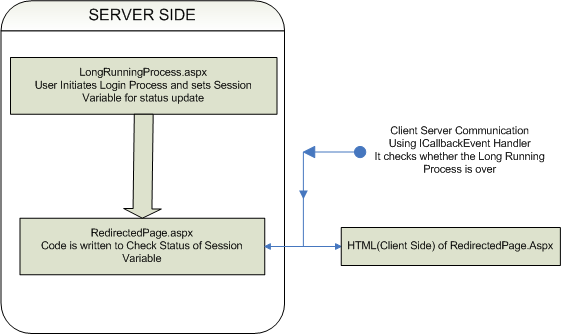
PROCESS FLOW(LOGICAL FLOW)
In our this code, we have used async method of delegate, i.e. BeginInvoke and EndInvoke.
On server side, we have used delegate and on button click event function named DoSomething() get called. This function take cares of LongRunningMethod registration for delegate and invoking of LongRunningMethod; this will be asynchronouse invokation on server side. While invoking LongRunningMethod we register AsyncCallback method i.e. CallBackMethod. In CallBackMethod we get object of IAsyncResult class as paramter. In this method we have just called EndInvoke method of delegate.
CallBackMethod method can be used to do other operations which may be dependent on the LongRunningMethod.
We will write our LongRunningMethod,that will be as follows

Above methos is simple implemtation for longrunning method.
We will declare delegate for above function , parameters for delegate and method should be same.
private delegate void LongRun(string name);
Implementation of Async process on server side

On button click event we will call DoSomething function.

Long.BeginInvoke in DoSomething will invoke LongRunningMethod method.
While implenting this just check parameters for BeginInvoke in .net.
CallBackMethod get called automatically after LongRunningMethod. CallBackMethod is used to end the invokation of delegate.
Upto this point we were discussing about Asynchronouse method invocation on server side. Now we will talk about Ajax check using ICallbackEventHandler for LongRunningMethod. (Note: if your are new to ICallbackEvent Handler, check out my article on ICallback, you can also download ICallback Demo. )
On Button Click in Above code (i.e. in LongRunningProcess.aspx page in demo) we initiate Long Running Process and Redirect to RedirectedPage.aspx. On Redirected Page we use ICallback to check status of LongRunning Process. We have used Session["result"] to check the status. Please make sure that you are understanding the code.
Using ICallbackEventHandler client browser polls to server for chekcing whether LongRunningMethod is over or not; in predefined time interval. If the process is over we send SUCCESS to client side. So if response from server singnifise that the LongRunningMethod is over we update the client. (RedirectedPage.aspx takes care of the status check, on this page we can have our other elements and other business logic, while in backend we can check for status of longrunning process.)
Here I assume that you are aware about the ICallbackEvent Handler, if not then please go through my article related to ICallback.
Download Demo Code For Free --> LongRunningProcess.zip , ICallbackEvent Handler
Submit this story to DotNetKicks

Read more...

Sunday, July 25, 2010

XMLHTTPJSClass - JSON Class for Ajax Operations

In the development of Ajax application many times we may come across following issues.
  • Need to update multiple text boxes simultaneously.
  • Fill more that one dropdown lists.
  • Combination of text boxes, dropdown lists and div tags.
  • Calling different web pages and different webservices

Means one event may lead to updating of many html elements. In such cases we will have to send Ajax request in a loop. Again for each request we will have to take care of timeouts and request failures. Here if data is static we can keep it on HTML page and using JavaScript can directly hide and show the contents. But if we have to use real time data and also choices of display vary according to choices of the user, in such case looping of Ajax request may not be a good idea.

In this article we will discuss about XMLHTTPRequest object and JavaScript. We will develop a JavaScript class in which we can vary our choices and also be able to update multiple HTML contents. Also this class can be extended as per the requirements.

We will first talk about class in JavaScript, there is no keyword called class in JavaScript but we can use function as a class.

Checkout following code


In above script if we remove obj.Msg = "HI"; we will get an alert with text Hello.


Now step by step we will start developing our JavaScript class.
1.Include JS file and write following


In this step we have created XMLHTTPRequest object and simply send call to the server. By default method is GET (this.Method = "GET") and calling type is Ascynchronous (this.Async = true)


2.In this step we will develop simple logic which will allow us to dynamically call Ajax function.

For this in our above Ajax function we will add one JSON (www.json.org) object as follows.


In above script we can set the default values for all. Please reffer demo JS file to understand this better. We will use these values to set response from the server to textboxes,drop down lists,Div tags, td tags etc. Using "CallPage" : "CallPage.aspx" we can define default server page and while calling Ajax function we can reset this value to web method or to any other web page.
As we will proceed in this article we will come to know how can we change all above values and how can we use it for multiple updation.Also we will see that how to extend the class for further customization.

3.As we have seen in 1st step;

this.request.onreadystatechange=this.handleResponse;
In this step we will develop this.handleResponse function also in this function we will use JSON object defined in 2nd step.
Whenever this.handleResponse function gets call script looses the focus of this. To keep trac of this object we will assing it to some variable. i.e


In this function we will be able to receive data from server. Once we get the data we can play with it the way we want.
This function will take care of the responses from web services as well as from web pages.
Difference is, web service returns response in the form of XML where are response from the webpage can be defined by web developer.

The function will be as follows


If there is any problem in understanding please go through above code again.

In the the 1st step we have


While developing Ajax application take care of following point.
  • URL for XMLHTTPRequest object should belong to same domain.
  • Firefox and other browser doesn’t allow cross domain communication.
  • IE will show warning

Thus our


e.g. "http://localhost/Demo/CallPage.aspx?"+this.JSONArray.Querystring;

Also when ever we want to call web methods like above example, we need to set following protocols under in web.config file.


4.Up to this point we have finished with development of Ajax logic which will return us response. And in this point we will develop logic for population HTML controls

In this.handleResponse (step 3) we have seen that we get response in
“data” variable in JavaScript.

So once we got response from the server we will write following logic


self.JSONArray.isEdit[0].textBoxId will contain id of the text box in which we have to fill the response. And data is the response from the server.
In 2nd step we have defined JSON object as follows


And in our above switch we have simply used the elements of JSON object

At this point we will see how to call our Ajax Class, how to initiate the request and how to set Elements of our JSON object.
Simply create object of our AjaxClass().


if obj.JSONArray.dependentType=1 then our switch case will not work for text box, but it will work for dropdown list (check above switch case). Means we will have to set dropdown list of JSON object.


and so on, we can define our own set of HTML controls to be filled.

In the same way we can change all default settings in JSON object of that class.
e.g. obj.JSONArray.Method = "GET";
obj.JSONArray.CallPage = "Mywebservice/webMethod";
obj.JSONArray.Querystring= "My querystring";

For this URL will be


In case of web service we will have to set CallPage element in the same way we did in above example.

Now for multiple textboxes simple trick,
obj.JSONArray.isEdit[0].textBoxId="txt1$txt2$txtn";//$ is a delimiter
While sending data from server send it with the same delimiter,in such a way when we split obj.JSONArray.isEdit[0].textBoxId and response data on $; we will get one to one data and textBoxId.

Now we can have different types like “txtbox(es) + drop down list(s) + div” in such case we can use "misc" option of isEdit element of JSON object.
And we can define our PopulateControls function the way we want.

Just think of the choices for getting Response from AjaxCall; we can develop very critical systems using this logic and keeping code as simple as possible. Also we can integrate our ICallback logic for large data transfer.


Demo JavaScript file is as below ( DOWNLOAD)


Download Demo Code here --> XMLHTTPJSClass.zip

Submit this story to DotNetKicks

Read more...

Saturday, July 10, 2010

Ajax-Handle complex data type (e.g. Class)

Use of complex data types in Ajax programming is a tricky part. In normal scenario we need to communicate between client and server via string manipulation only. (Demo Code)
In this article we will discuss about, Microsoft Ajax and the way we can handle complex data types. We shall use web service for Ajax communication; web service will be exposed to client using Script Manager. Complex data types can be handled using JSON objects, in this article we will discuss only about how to handle complex data types. Script Manager internally uses JSON serialization class for handling complex data types; so will not care about the JSON about in this article.
Let’s assume we have a Public class Employee as below.


In above class the elements which we need to be accessed in JavaScript are public; here we are not considering any function in a class.

Again we are going to expose a web service to Script Manager for this article. So we also have a web service in demo code it is “WebService.asmx”.
Following two namespaces are required to make a web service Ajax Enabled. We will not go into any details of these namespaces.
using System.Web.Script.Services;
using System.Web.Script.Serialization;
Our web service class is as below


Following are the two extra things we have added above the WebService class, this is to indicate that the web service will be called from JavaScript, and is enabled of Creating corrosponding script object of class Employee.


In the Demo, Employee and WebService both classes are added under namespace Demo, and are in the same file “webservice.asmx”.
Our server side code ends here. Now we shall develop only client side code.
Our form tag is as follow


In above code, we have used script manganer and registred our web service and JavaScript file.
Here onwards we are going to deveolp JavaScript
Calling of WebService methods using JavaScript and script manager is very simple, we just need to use the simple namaspace sequence.
e.g. If we want to call getDefaultData function of a webservice we simply needs
Demo.WebService.getDefaultData().
If we want to add a response handler we just need to specify the function name in bracess like Demo.WebService.getDefaultData(OnSucceeded)
For the demo purpose our JavaScript contains mainly three functions

_getDefaultData() – This JavaScript function is used to call a webmethod getDefaultData. This Web Method returns default data Set for the Employee class.
The JS function is as below


_sendDataToServer() – This JavaScript function is used to pass client side input to the server, or to the web method.
The JS function is as below


IN ABOVE FUNCTION CHECK THE WAY WE HAVE CREATED OBJECT OF AN EMPLOYEE CLASS. THIS EMPLOYEE CLASS EXISTS IN C# CODE, BUT USING AJAX.NET WE ARE ABLE TO CREATE INSTANCE ON CLIENT SIDE AS WELL.

OnSucceeded(result,userContext, methodName) – This JavaScript function is used to Handle response from the server. The function is as below


Download Demo Code here ---> DealingWith_ComplexTypes.zip
Submit this story to DotNetKicks

Read more...

Friday, June 25, 2010

DataTable To JSON Array

In this post I will discuss about converting any data table in the JSON array. JSON can be very effectively used for Ajax operations since data handling becomes more easier in case of JSON. Here I will not discuss how to use JSON in Ajax. I will simply provide code for converting Data Table into JSON Array.
Remember to add System.Web.Script.Serialization and System.Globalization; namespaces
Let us assume a demo table as below (DOWNLOAD)

For this table JSON output will be as below

Add following functions to build JSON string from an object

Above functions will be responsible to convert an object into JSON variable, now we will write one function which will break the table and call above functions, which in turn update the string builder.

In page load we will simply call following code, this will convert table into JSON string and write it on Page.

In above code I have registered JAVA script block as well, this just for demo purpose; if we put following code we will get an alert with first employee ID.

Download Demo Code Here --> DataTableToJSONArray.zip
Submit this story to DotNetKicks

Read more...